We offer free and for sale applications for Tablets and Smartphones among others with Android 8.0 operating system and higher versions . The programs were developed using mobile electronics development software such as the open source version of Android Studio in its most current version .
Our mobile applications are updated and compatible with Google Play Store, however in 04/2025 we
discontinued the process of installing our mobile apps on this platform. While we do not present another virtual store similar to
Google for the installation of our mobile apps, links to download the packages or apk files of our apps have been included,
the programs are downloaded to the Download folder of the mobile electronic device Smartphone, Tablet among others similar from where it is
possible to click and install the program, the Android operating system checks for compatibility to perform the installation .
The mobile apps are located in a folder on our own internet domain www.acessorelacional.com.br with the developer name Softenlance .
The apps are presented in some languages such as Brazilian Portuguese (pt-br), English US (en-us), French FR (fr) and Spanish ES (es).
The names of the applications in the installation file are the same for any of the languages following the nomenclature for those in the Brazilian Portuguese language.
The link below provides a document about our original privacy policy that provides other important information about our mobile applications .
Privacy Policy for Developer Android Apps Softenlance
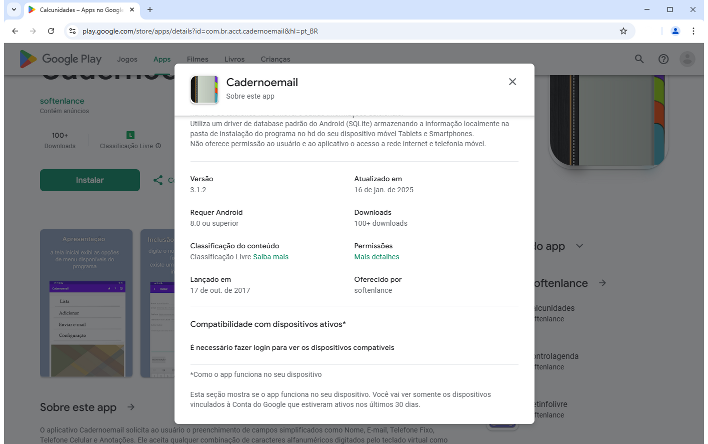
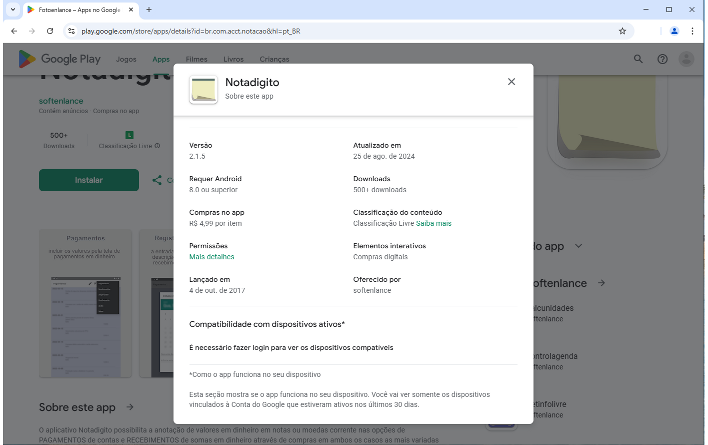
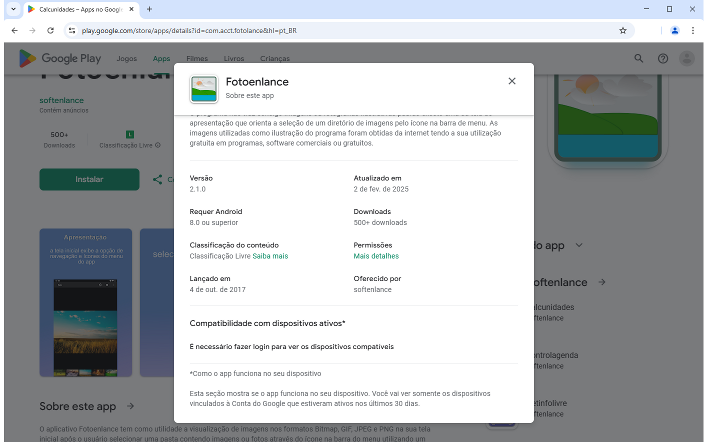
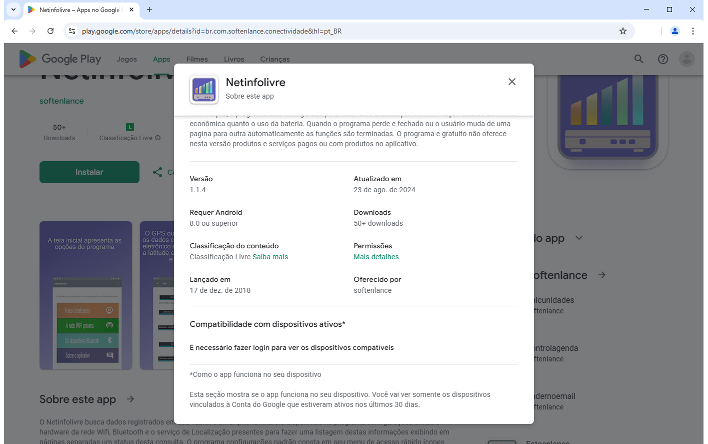
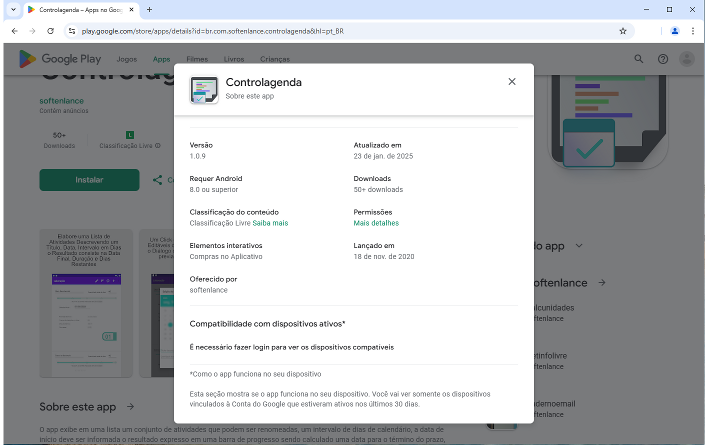
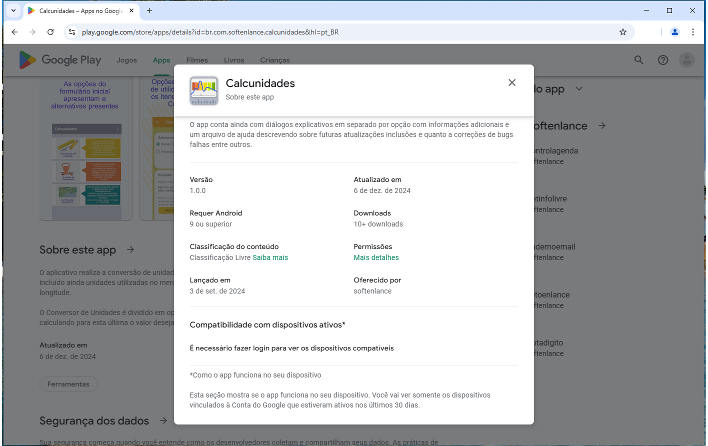
A screenshot of the display of apps on the Google Play Store is presented below with some installations and ratings
given to our apps when they were present by the application installation program for the Android mobile electronics platform .
 Emailnote
The Emailnote application asks the user to fill in simplified fields such as Name, E-mail, Landline, Cell Phone and Notes. It accepts any combination of alphanumeric characters typed by the virtual keyboard as input data, the Name field is however the only one that cannot be left unfilled . Fields without information are accepted as input by the software .
An icon representing the filling state of the fields will automatically be displayed with the Name and Email fields in a display listing .
It is possible to include, exclude and edit the recorded data; the e-mail option uses the program's configuration information to present the user with an alternative for sending a text message to one of those listed .
* The Name field is the search field for listing and excluding records ;
* Uses an e-mail client program to send the electronic message ;
* Offers fields for registering mobile and landline telephones, however it does not have access to telephone dialing ;
* Stores the information locally in the program's installation folder ;
* Does not use any user and application permission resources except the local writing of the database ;
* The option to print the data from the list of added names has been included ;
This free version features utility in noting personal information of name, e-mail, landline and mobile phone numbers and other additional information .
It uses a standard Android database driver (SQLite) storing the information locally in the program's installation folder on the hard drive of your mobile device Tablets and Smartphones .
It does not allow the user and the application access to the internet and mobile telephony .
It uses the Android API 26 to 33 specification library, it has its development date and last update in january/2025 .
Items included in this Version 3.1.2 :
* Name, E-mail, Cell Phone, Landline and Notes form fields ;
* Inclusion, Editing, Deletion and Location of database records ;
* Uses native Android java SQLite database driver pattern ;
* Simplified configuration options ;
* Data source stored locally in the program installation directory ;
* Use of an e-mail client program to send e-mail messages ;
* There was the inclusion of the option of printing the data of the list of names added in a file in PDF format ;
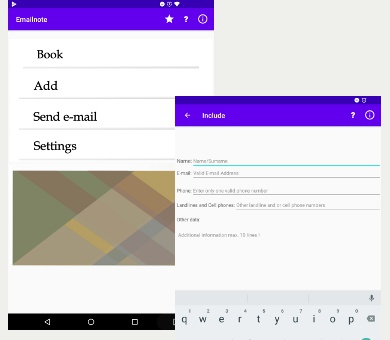
This program does not require any special permissions for its operation.
Link to download the Mobile App Emailnote
 Addnotes
The Addnotes application allows the recording of cash values in banknotes or currencies in the PAYMENT options for bills and RECEIPT of sums of money through purchases in both cases the most varied modalities of these two forms can be used in the use of the program. he requests on separate pages a calendar date of the credit or credit, this amount in currency and a description for the amount registered.
It only supports inclusions of personal notes of expenses and receipt of amounts at the level of individual personal consumption.
Receive or Credit is used as a synonym for value received for service provided, merchandise sold, return of amounts borrowed, money given by relatives and acquaintances, etc.
Payment or Debit is used as a synonym for payment of monthly bills for water, electricity, gas, cable TV, plans Internet access, vehicle fuel, health plans, credit cards, club monthly fees, courses, gymnastics, vacations, and others is also in individual personal format.
Inclusion, edition and exclusion of registered data performed by clicking on the displayed listing record.
* The data field constitutes the search field for listing and ordering records ;
* It uses a configuration text file for the data selected and typed in the Settings option ;
* Records the date, a description of the Payment and Receipt record on separate pages, and the currency amount current of this inclusion ;
* All necessary and generated data are saved in the program installation directory ;
* Message and alarm reminder for an important record date ;
* Mathematical calculations and arithmetic mean of currency value records ;
This free version presents and requests simplified data using a keyboard. On the virtual screen of the mobile device, the user informs a description in text format to identify the record, a calendar date value and a numerical value floating point value in current currency; there is a configuration option that can schedule an audible alarm that also requests a time in hours and minutes.
It uses a standard Android database driver (SQLite) to store the information locally in the program's installation folder on your mobile device's hard drive Tablets and Smartphones.
It saves a text file with the program's configuration in the application's folder .
Do not allow the user and the application access to the application. internet network and mobile telephony .
Utiliza a biblioteca da especificação do Android API 26 até 33, ele tem a sua data de desenvolvimento e última atualização em agosto/2024 .
Items included in this Version 2.1.5 :
* Date selection fields, Record Description, and Currency Amount form fields ;
* Inclusion, Editing, Deleting, and Selection of Database Records ;
* Uses the native standard Java SQLite Android database driver ;
* Simplified configuration options ;
* Sound alarm and message to inform about an important Payment or Receipt date ;
* Sum and arithmetic mean of the numerical value field currency classification by YES and NO of completed events and by future completion;
* The program includes filtering records by calendar date range and also uses the same feature to exclude records from the PAYMENT and RECEIPT databases ;
* The version for sale or with products in the application offers the possibility of printing all records of PAYMENTS and RECEIPT in PDF file format that can be saved in the internal storage of the Android device in a folder created by the program.
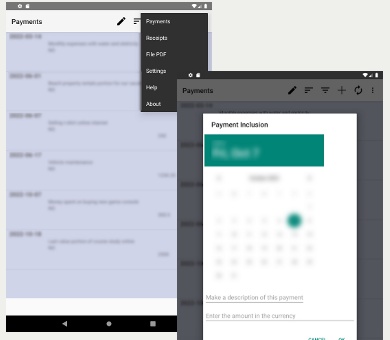
This program requests Local Storage permission for its operation as it needs to write the program settings file and to create and save the PDF file listing the database records.
Link to download the Mobile App Addnotes
 Photoenlance
The Photoenlance application is useful for viewing images in Bitmap, GIF, JPEG, PNG and TGA formats on its home screen after the user selects a folder containing images or photos through the icon on the menu bar using a file explorer. Images can be selected using the thumbnails at the bottom of the screen from your Smartphone and Tablet Android.
The program also offers the display of images in a Grid with two columns as standard options of 1, 2, 4 and 8 columns are available through the menu on this page.
Another utility provided in displaying the images in a Slide Show timing options of 0.5, 2, 5 and 10 seconds and full screen display by Zoom menu option.
This version includes features in menu with Select Folder, Settings, Help e About the Settings item provides, in one of its alternatives, the record of the last directory or folder accessed, initializing it the next time the program is used, and another that configures the way in which photographs are displayed on the initial screen.
* Display is viewing images in some of the most popular image formats ;
* Slide show of images and display in a grid divided into columns ;
* Simplified configuration with instructions for using the program also available through a menu item ;
* Compatible with Android Smartphones and Tablets with the most varied screen dimensions available for sale ;
* The name of the image files ordered in ascending order, the folder may also contain files of other formats ;
* File format filtering and selection of image files only ;
This free version requires a folder with images that must be located in the sdcard/Downloads, also called the internal memory of your mobile device. This may even contain other types of files that are filtered by the file explorer, displaying only image formats .
It uses a configuration file in text format created and saved in the program's installation directory on your mobile device's hard drive .
It does not allow the user and the application to access the internet and mobile phone network .
It uses the Android API specification library 26 to 34, it has its development date and last update in february/2025 .
Items included in this Version 2.1.6 :
* Display of images using a standard viewer, slide presentation and grid composed of variable columns ;
* Varied image formats and sizes compatible with Android Smartphones and Tablets ;
* Configuration of display modes on the home screen with the possibility of adjusting the image to the screen size for photos with reduced dimensions and displaying large images without loss of graphic resolution ;
* Use a file explorer to locate the folder with the images or photos ;
* Filtering and ascending sorting of images in bmp, gif, jpg, jpeg, jpe, png and tga formats from selected images folder;
* Display image name in view on grid option ;
* Compatible with Android Smartphones and Tablets with the most varied screen dimensions available for sale ;
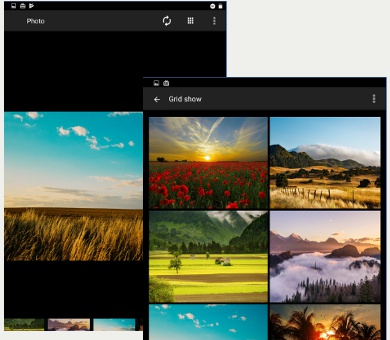
The program does not have standard illustrative images or photographs, except for one on the presentation screen that guides the selection of an image directory by the icon on the menu bar. The images used as an illustration of the program were obtained from the internet and are free to use.
This program requests permission to read the SDcard internal storage media for its operation through the explorer for files, the user should locate a folder containing images, photos, illustrations or drawings to read.
Link to download the Mobile App Photoenlance
 Netinfolibre
 searches for data recorded on your Android Smartphone or Tablet available in the settings program, uses the hardware of the WiFi network, Bluetooth and the Present Locations service to list this information, displaying a status of this search on separate pages. The program's default settings have icons in its quick access menu for activating and deactivating these services that must be activated.
* The information is searched when the application is being used with little battery consumption;
* Displays information about Location, Wifi and or Bluetooth and the Local configuration must be turned on;
* The data reported in this version is not recorded in a text file on disk;
* Location or GPS displays the address, latitude and longitude in two formats, altitude or elevation of the location and the accuracy of the radial measurement of this location;
* Wifi displays wireless network connections close to your access point which can usually be a wireless router;
* The Bluetooth network works independently of the wireless network, however it depends on Location being activated, nearby Bluetooth devices are displayed on this page;
This free version asks for some permissions related to your Wifi, Bluetooth and Location network that are used to be displayed by it on your program pages.
The program does not save the data displayed on its pages as information in a file in this edition;
Its operation is configured to have its functions activated only when in use and to consume little battery;
It uses the Android API specification library 26 to 34, it has its development date and last update in august/2024.
Items included in this Version 1.1.4 :
* Location, WiFi network and Bluetooth are included as a source of data that is displayed by the program;
* Low battery consumption Short update and search interval Functions are used only when the program is used;
* Does not use notifications and informational operating system resources to pass or collect data in real time and offline;
* New navigation design uses API 33 providing support for APIs older than 26;
* The expressions wireless network, wireless, Wi-FI, Wifi and WiFi are used interchangeably;
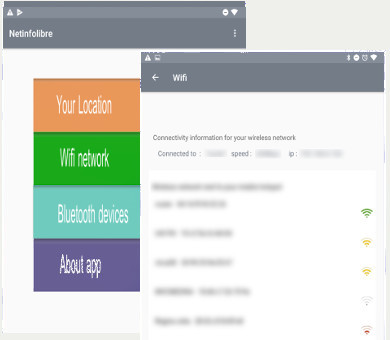
The program needs the Location permission enabled the location information data or GPS depends on the configuration by the user on his mobile device the accurate record of his location in Google services as part of his current location information consulting data from his local network WiFi data including latitude, longitude, altitude and the accuracy of this data for your current location is displayed on the form of the program's GPS page. WiFi network and Bluetooth depend on enabling a wireless network connection and Bluetooth of this device when available.
Link to download the Mobile App Netinfolibre
 Controlschedule
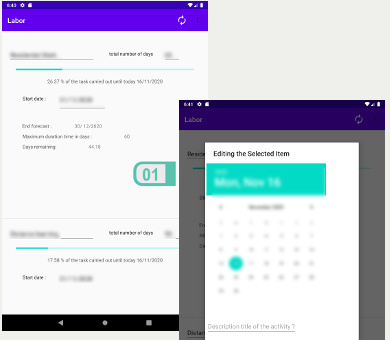
The Controlschedule displays in a list a set of activities that can be renamed, a range of calendar days, the start date must be informed, the result expressed in a progress bar, a date for the end of the term being calculated, duration time maximum and remaining days.
Another option present in consists of a pantry of consumable products that makes it possible to edit the data of the fixed set of items that includes values for the consumption rate, quantity and start date, the end date is estimated, the duration time and the Days Remaining.
The first option is complete when the progress bar reaches 100% of its completion, the list with the item displays a completion image that changes from the one originally displayed by default; in the second option, an image with a basket with a negative sign when the total quantity of items reaches a value lower than 5% of the initial total value of the product configured by the user.
* The listings are displayed by text controls that, when touched, display a dialog for modifying previously registered data;
* Uses only the local storage for reading and writing the application's database in the standard Android SQLite format;
* An image and progress bar are used as graphic elements indicating the completion of the task and for the pantry with its products when it is empty;
*A recycle button updates the list data after editing one of the items;
* Compatible with Android Smartphones and Tablets with the most varied screen dimensions available for sale;
This free version requires local storage to be issued;
The program has a database file for recording the data only displayed by it in the listings;
The pantry uses a healthy middle-aged adult male or female as the estimated daily consumption rate of the products;
It uses the Android API specification library 26 to 33, it has its development date and last update in january/2025 .
Items included in this Version 1.0.8 :
* Page for recording time for carrying out tasks or activities and for consuming pantry products consisting of a set of consumable food, cleaning, beverages, etc;
* Low battery consumption does not use internet network resources in this version;
* Does not use notifications and informational operating system features to pass or collect data in a timely manner real and offline;
* New navigation design utilizes API 33 providing support for previous APIs up to at 26;
* Compatible with Android 8.0 operating system and higher versions;
This program does not ask for any special permission for its operation and run .
Link to download the Mobile App Controschedule
 Calcunits
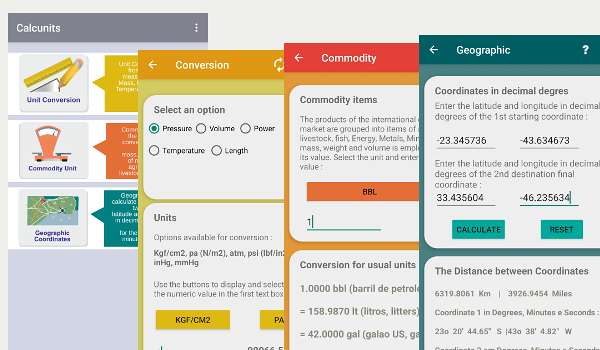
The Calcunits mobile app is useful for converting units of measurement in this initial version, Pressure, Volume, Power, Temperature, Mass and Length are included.
There is a page for commodity units where the calculation of the conversion of mass, volume and weight values from numerical units for agricultural, livestock,
mineral and energy products can be performed, last item included the geographic coordinates calculates the distance in kilometers and miles between two latitude and
longitude coordinates provided in decimal degrees, even converting to the ° degrees ' minutes and " seconds format .
In the first option Unit Converter, the oldest units of measurement of physical quantities are present, some of which today make up the International System of Units and
the metric system of measurements is also used, among the options that appear there is the following division: Pressure Kgf/cm2, N/m2, atm, psi(lbf/in2), bar, inHg and mmHg;
Volume lt, US gallon, m3, dm3, cm3, in3 (cubic inch) and ft3 (cubic feet); Power KWh, Btu, KJ and hp; Temperature oC (degrees Celsius), oF (Fahrenheit), Kelvin and oR(Rankine);
Mass t(ton), Kg, lb, g, milligrams, micrograms; Measurement Km, m, cm, mm, micrometers, nanometers, ft (feet), in (inches), mi (land miles) and NM (nautical miles) .
The Commodity Unit option includes products and raw materials of commercial and economic importance that are included in an international quotation and trading market or
commodities, which are items known to be of fundamental importance to the wealth of a country and its people; the units included are applied to some commodity items,
for example: barrel of oil, crude oil in bbl (barrel of oil), natural gas in MMBtu (1 million Btu), gasoline, heating oil in gallons; wheat, soybeans, oats, corn in bu (bushel);
soybean oil lb (pounds); beef, pork in lb; coffee, cotton, orange juice, sugar in lb; gold, silver, platinum, palladium, copper in t oz (troy ounce); coal, banana, chicken,
vegetable oil, milk, rubber, orange juice, ethanol, zinc, molybdenum, aluminum, among others, including the listing with units in Kg, lb, million tons (mt), short tons (st),
metric and long tons, troy pounds, etc .
The Geographic Coordinates from a set of two floating point values for a starting coordinate and a destination coordinate, both in decimal degrees, the program
calculates the distance in kilometers and miles between them, converting the input values into ° degrees, ' minutes and " seconds .
* The app in this version 1.0.0 does not write to calculation data files and does not require other information from the internet to function;
* Installation file with reduced file size in megabytes ;
* Does not share its routine functions, data and files with other Android applications ;
* The WiFi network data is not required only to update the app, local permission or your location is not used nor is its activation requested ;
* The resources of the internet network and sensors, among other hardware and software, of the user's mobile device in this version 1.0.0 are not necessary thus dispensing with their use .
The calculations follow equations and formulas known in science literature and internet homepages .
Future updates may contain new items in the unit converter, commodity unit and geographic coordinates, a map with graphical elements containing the numerical data of the computation and a trace connecting the departure and destination coordinates .
The app has an About and Help page where other important information about using the app, correcting calculation errors and bugs, data must be confirmed using other similar applications, a calculator through a conventional manual calculation and/or when greater precision and correction of numerical values is required .
It uses the Android API 26 to 34 specification library, its development date and last update were in december/2024 .
Items included in this Version 1.0.0 :
* New graphic and navigation elements use API 34 OS Android 14 provides support for previous APIs up to 26 Android 8 ;
* Uses the source codes of the standard Java libraries of Android Studio ;
* Compatible with the resolutions and screen dimensions of mobile electronics available for sale from Android Smartphones and Tablets among others ;
This program does not request any special permissions to run .
Link to download the Mobile App Calcunits
We at Acessorelational work on the development of applications and utilities with use in desktop and notebook computers for the most varied operating systems and hardware configurations currently available, we try to add to our programs the portability of the source code in terms of its functionality in the most varied computing platforms, we use the programming languages; Java and C/C++ and opensource compilers. Applications are available for sale at affordable prices, we offer free technical support for all available versions of our programs. We store our pages on the same domain on cryptography and hash algoritm, databases, financial calculation applications, a php script program for Cloud Storage, Online Shopping and a homepage with a tutorial on informatics. The homepage can be accessed through url http://www.acessorelacional.com.br using a microcomputer instead of mobile electronics . These applications cited in this section are not multilingual available however the inclusion of an internal selector may be included in a future occasion .